

到了 2026 年,在當今競爭激烈的電子商務市場中,Shopify 商店如雨後春筍般湧現。 It’s no wonder, as Shopify makes it easy for entrepreneurs and business owners to create and manage their stores, generate traffic, and drive sales.
在銷售產品時,許多企業忽略的關鍵因素是提供預訂。 透過預購按鈕,您可以允許客戶在產品正式發布之前購買產品。
這使客戶有機會儘早獲得產品,並鼓勵他們成為回頭客。此外,當客戶在產品上架之前付款時,它可以讓您產生更多利潤。
幸運的是,有多個 Shopify 應用程式可以提供預訂,其中之一就是 通知我! 補貨和預訂。
In this article, we will take a look at how to add a pre order button to your Shopify store with Notify Me through five essential steps to making this happen.
聽聽艾簡介:
Notify Me!™ · [Notify Me! AI 簡述] How to add a pre order button to your Shopify store](https://soundcloud.com/partnership-696909108/ai-brief-of-notify-me-how-to-add-a-pre-order-button-to-your-shopify-store)
為什麼要提供預訂?
As mentioned, offering pre-orders can be a hugely beneficial move for businesses, especially in the case of highly sought-after, limited-edition items. pre-orders give customers a chance to figure out their bile for market allowity markettomers a chance to figure out their bap market out their bap marketth still in the manufacturing process.
此外,預訂單允許客戶估計其商品的確切交貨日期。 This is beneficial for customers because it helps them plan around the delivery and reduces the likelihood of disappointment or problems due to the item not arriving on time.
閱讀更多: 可增加您收入的 Shopify 最佳預購應用程式
如何在 Shopify 上建立預購按鈕
幸運的是,使用正確的工具,在 Shopify 商店中新增預訂按鈕非常簡單。 這就是 Shopify 通知我的地方! 補貨和預訂應用程式登場。
此應用程式旨在幫助商家輕鬆提供和管理 Shopify 上的預訂。 它允許您在客戶訂閱的已售完商品重新有貨時通知他們。 Besides, you can set up pre orders to appear on any page of the site, as well as create a customized pre order button with colors and links to each product’s page.此外,您還可以為批量銷售啟用數量折扣。
第 1 步:安裝應用程式
第一步是安裝通知我! Shopify 商店中的補貨和預訂應用程式。 您可以在 Shopify 應用程式商店中找到它。 或者,您可以簡單地登入 Shopify 儀表板,在頂部欄上搜尋它,然後安裝它。

第 4 步:設定預訂單在開始提供預訂之前,您需要確保已設定所有必要的設定以在商店中顯示預訂按鈕。
基本上,你必須有缺貨的產品才能讓你的客戶預訂。 但請記住,並非所有缺貨產品都會自動顯示預訂按鈕。
確保您要啟用預訂功能的商品已開啟「缺貨時繼續銷售」選項。 這樣,即使產品缺貨,仍然可以購買。 若要啟動此選項,請前往 Shopify 中的產品頁面,然後按一下庫存部分。
此外,還有確定何時顯示預購按鈕的特定設置,例如計費政策、折扣選項和交付履行觸發器。 您可以自訂它們以符合您商店的偏好。 前往“小部件”選項卡 >“預訂”->“設定”。我們的指南如何在 Shopify 上設定預購涵蓋了完整設定,包括訂金和付款條件。
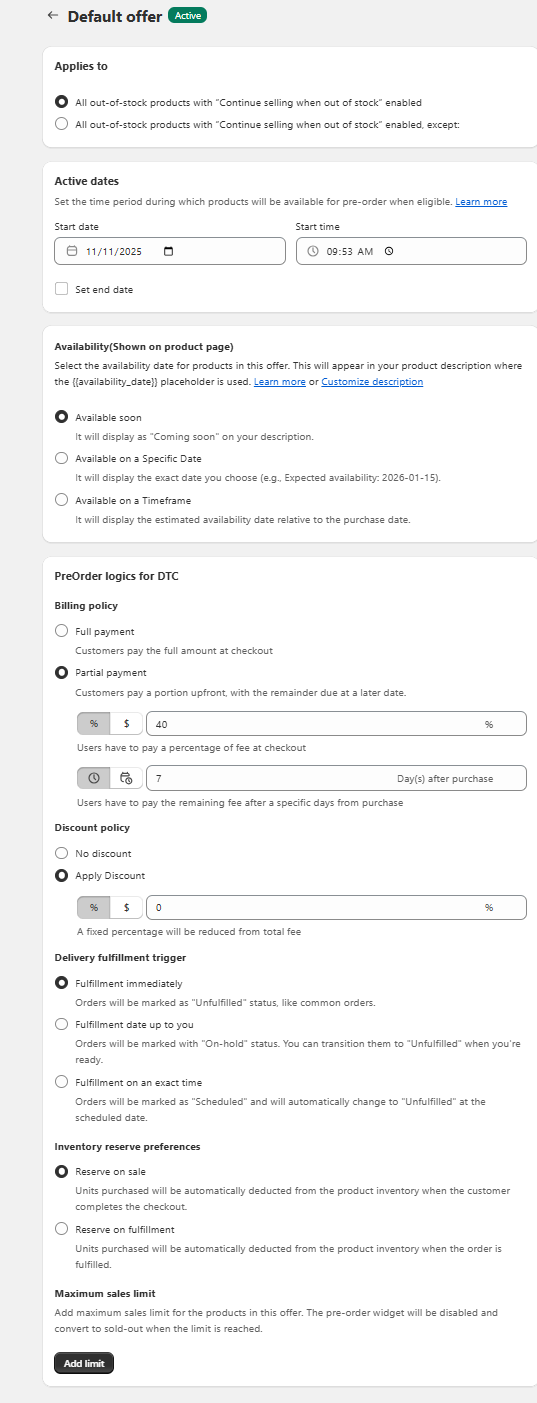
第 5 步:監控您的預訂單
最後一步是監控和管理您收到的預訂單。 確保追蹤訂單並確保在訂單處理和發貨後通知客戶。您可以從報告部分監控訂單。 在這裡,您將概覽已下的各種預訂單和已出貨的預訂單。
「通知我」將為您提供有關客戶情緒的寶貴見解,並讓您有機會衡量預訂是否成功。 這可以幫助您確保客戶滿意度並為未來的訂單鋪平道路。

結論
對於希望在競爭中保持領先地位的企業來說,向 Shopify 商店添加預訂按鈕可能是一項寶貴的資產。 透過為客戶提供預購他們想要的產品的機會,您可以讓他們領先一步並在限量版商品售完之前搶到。
Notify Me 為商家提供了一種簡單、直接的方式來在其 Shopify 商店中添加預購功能。該應用程式具有可自訂的預訂按鈕、自動通知和取消預訂的功能等功能,是 Shopify 商家最容易使用的工具之一。
常見問題
為什麼企業應該提供預訂?
預訂可能是有益的,特別是對於備受追捧的限量版商品,因為它們可以讓客戶為商品製定預算,並使您能夠在商品仍在製造的同時對其進行營銷。
建議使用什麼 Shopify 應用程式來設定預訂單?
通知我! 建議使用補貨和預購應用程序,以便在 Shopify 商店上輕鬆提供和管理預購訂單。