

As an e-commerce business, you know the importance of staying connected with your customers. You want to ensure that customers are informed about their orders, receive promotions and rewards, and stay updated on the latest news about your business. That’s why Shopify SMS and WhatsApp notifications are a great way to keep customers in the loop and ensure that they stay engaged with your business.
NEW: You can also send WhatsApp Restock message with our app too. You can read more about it here.
If you want to stay ahead of the competition and keep your customers informed when your products are restocked, sending out Shopify back-in-stock SMS notifications is a great way to do that. With our app, Notify Me, you can easily inform your customers when your products are restocked.
At Notify Me, we understand how important it is to keep your customers engaged and informed. That’s why we’ve made it easy for you to send out Shopify back-in-stock SMS notifications. Our app is designed to be simple and easy to use, so you can start sending notifications quickly and easily.
You can choose which products to send notifications for and which customers to send notifications to. You can also customize the notifications with your own branding and messaging.
We also make it easy to track your notifications. You can easily see which notifications were sent, who received them, and how many customers opened the notifications. This helps you better understand your notifications’ effectiveness and make changes as needed.
So, if you’re looking for an easy way to keep your customers informed when your products are restocked, look no further than Notify Me. This app makes it easy to send out Shopify back-in-stock SMS notifications so that you can stay ahead of the competition. We’ll also discuss how to customize the notifications and how to track their effectiveness. So, let’s get started!
Listen to the Ai-Generated podcast version of this blog post from here:
Notify Me!™ · AI Podcast of Notify Me! How to Send SMS with Notify Me?
Benefits of sending back-in-stock SMS notifications
When it comes to engaging customers and keeping them informed about their purchases, sending back-in-stock SMS notifications is a great way to do just that. This type of notification has become increasingly popular in recent years, as it provides customers with an easy way to stay up to date on the availability of their favorite products.
For customers, back-in-stock SMS notifications are a great way to ensure that they don’t miss out on the products they want. By providing customers with an easy way to stay on top of new stock availability, they don’t have to keep checking the website to see if their desired item is back in stock. This can be especially beneficial for items that are in high demand, as customers can be notified as soon as they become available.
For businesses, back-in-stock SMS notifications also have a number of benefits. These notifications can be used to drive sales, as customers will be more likely to purchase an item that they know is available. Additionally, these notifications can help businesses stay top of mind with customers, as they provide a way to stay in contact with customers without sending them frequent emails. This can be especially effective for those customers who don’t check their inboxes regularly.
Overall, back-in-stock SMS notifications are an excellent way for businesses to keep customers informed and engaged. Businesses can drive sales and keep customers returning by providing an easy way to stay updated on new products and stock availability.
Why add WhatsApp messaging to your Shopify store too?
****In addition to SMS, we’ve now integrated WhatsApp notifications. With open rates often exceeding 90%, WhatsApp allows you to reach customers on their favorite messaging app. It’s a more personal, conversational way to alert them that their favorite products are back, making it even easier for them to complete their purchase with a single tap.
Send Shopify SMS Notifications with Notify Me
Working with Notify Me is simple and easy. After you add the app to your Shopify store from the Shopify app store, you need to go through the following steps
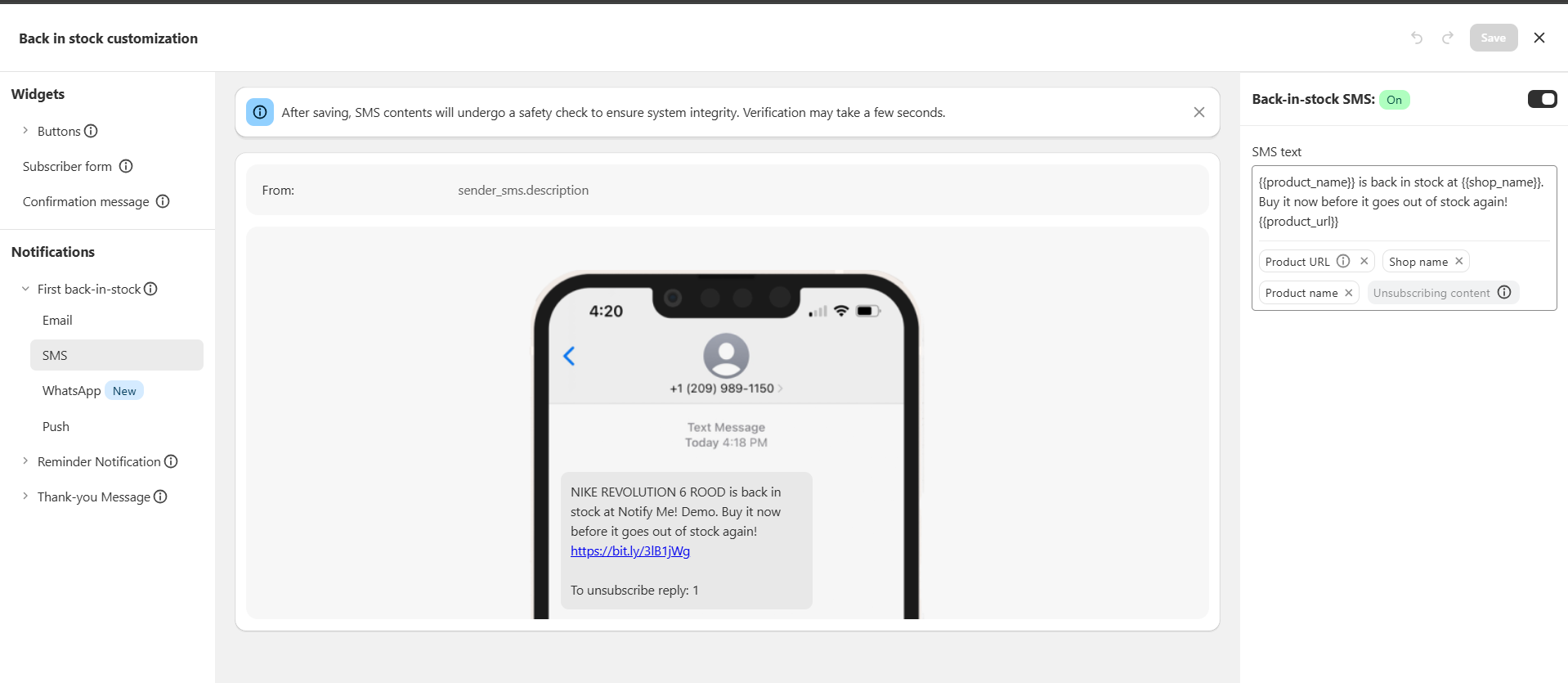
You can edit the SMS content and personalize it by adding variables like:
-
Shop Name
-
Product Name
-
Product URL (this one is mandatory)
You can also change and customize the variables by following these steps:
-
Click on the text box where you want to insert the variable.
-
Select the variable from the variable selector to add it.
-
You can easily add or remove variables by clicking on them.
And as simple as that, you can send back-in-stock SMS notifications to your customers. Also, you can track the status of SMS notifications from the Reports section.
Wrap Up
In conclusion, using Notify Me to send back-in-stock SMS notifications is an effective way to ensure that customers are kept informed of product availability. This allows customers to get the products they want without waiting for them to become available again. Additionally, with the added convenience of SMS notifications, customers are more likely to keep coming back to your store for their shopping needs. Not only does this help build customer loyalty, but it also increases your store’s visibility and sales. By taking the time to set up and utilize these tools, you’ll be able to serve your customers better and ensure that they have the best shopping experience possible.
Frequently Asked Questions
What are the benefits for customers receiving back-in-stock SMS notifications?
Customers benefit by being instantly informed when a desired product is available, ensuring they don’t miss out, especially on high-demand items, and eliminating the need for them to constantly check the website.
How can businesses track the effectiveness of their back-in-stock SMS notifications?
Businesses can track the status of SMS notifications from the Reports section within the Notify Me app, allowing them to see which notifications were sent, who received them, and how many customers opened them.